
choose and invest
How to Choose and Invest in a Portfolio Recipe
This guide walks through the two steps to put a Portfolio Recipe to work: choosing a recipe that fits your goals, then investing in it at your brokerage. The same steps you use to invest also rebalance your holdings each month, when a tactical recipe publishes new allocations. Start with Choose, then continue to Invest.
How to Choose a Portfolio Recipe
1. Signup for an Investor or Pro subscription.
To see the full percentage allocation for every Portfolio Recipe. Or use the Free subscription to see every Portfolio Recipe's performance and upgrade when you are ready to invest.
2. Find a few Portfolio Recipes that look interesting
- Log-in at go.recipeinvesting.com/login and click "Portfolio Recipes" to see all the portfolios we track.
- Find the scatterplot at the top of the page (see example below). Each dot represents a different Portfolio Recipe, plotted by its Risk and Return.
- Look for portfolios closest to the green smiley face at top left of the chart. These portfolio recipes have lower risk and higher return.
- Hover over any dot to see the portfolio ID, risk metric, and total return.
- Click any dot to see that portfolio's detailed metrics.

- Compare Portfolio Recipes using the table below the scatterplots. Click on a column heading (e.g., "10 year") to sort by that column.
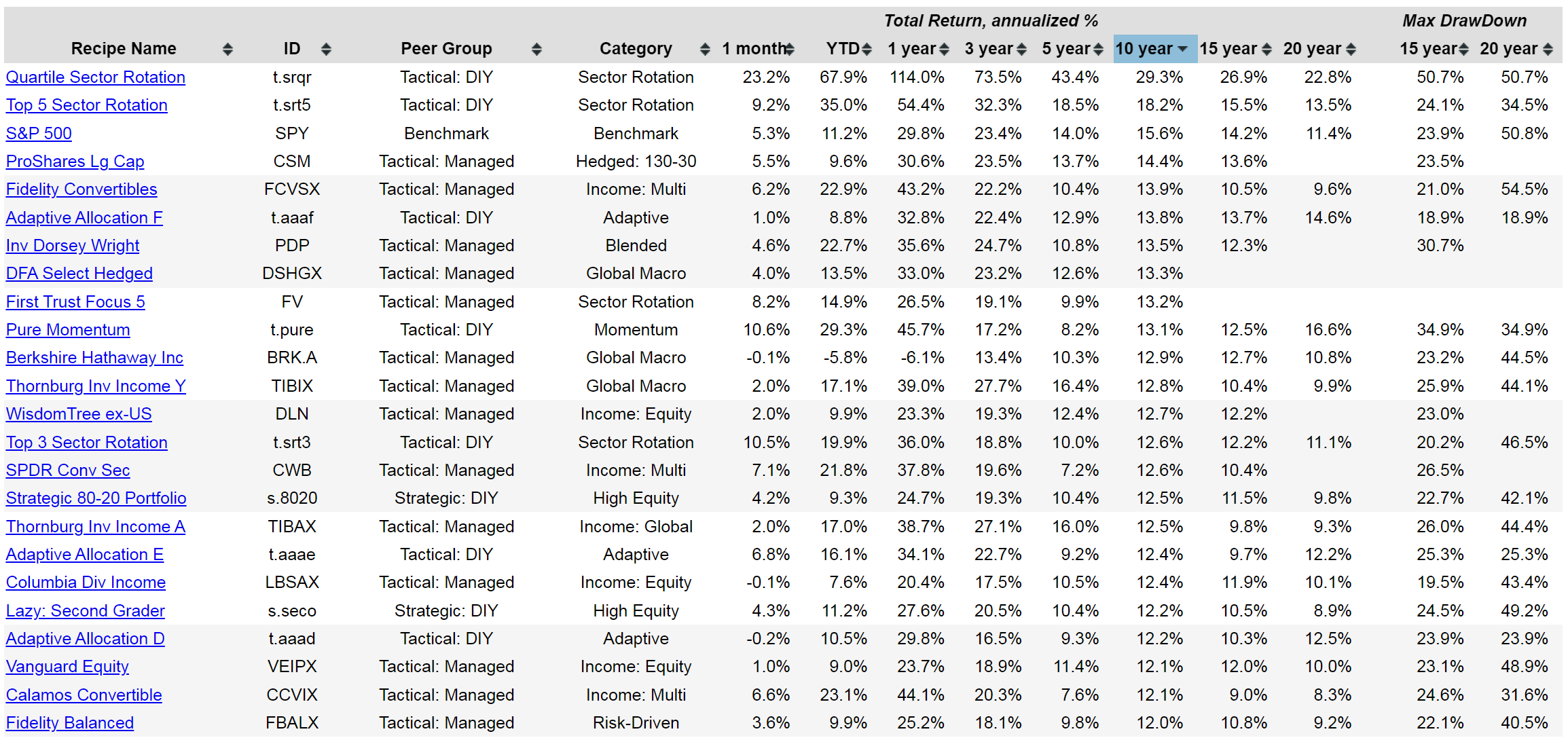
3. Review each Portfolio Recipe's details
After you have found Portfolio Recipes that you are interested in, click each Portfolio Recipe name to see its details. Explore the Portfolio Recipe's performance metrics and risk vs. return over the past 20 years.
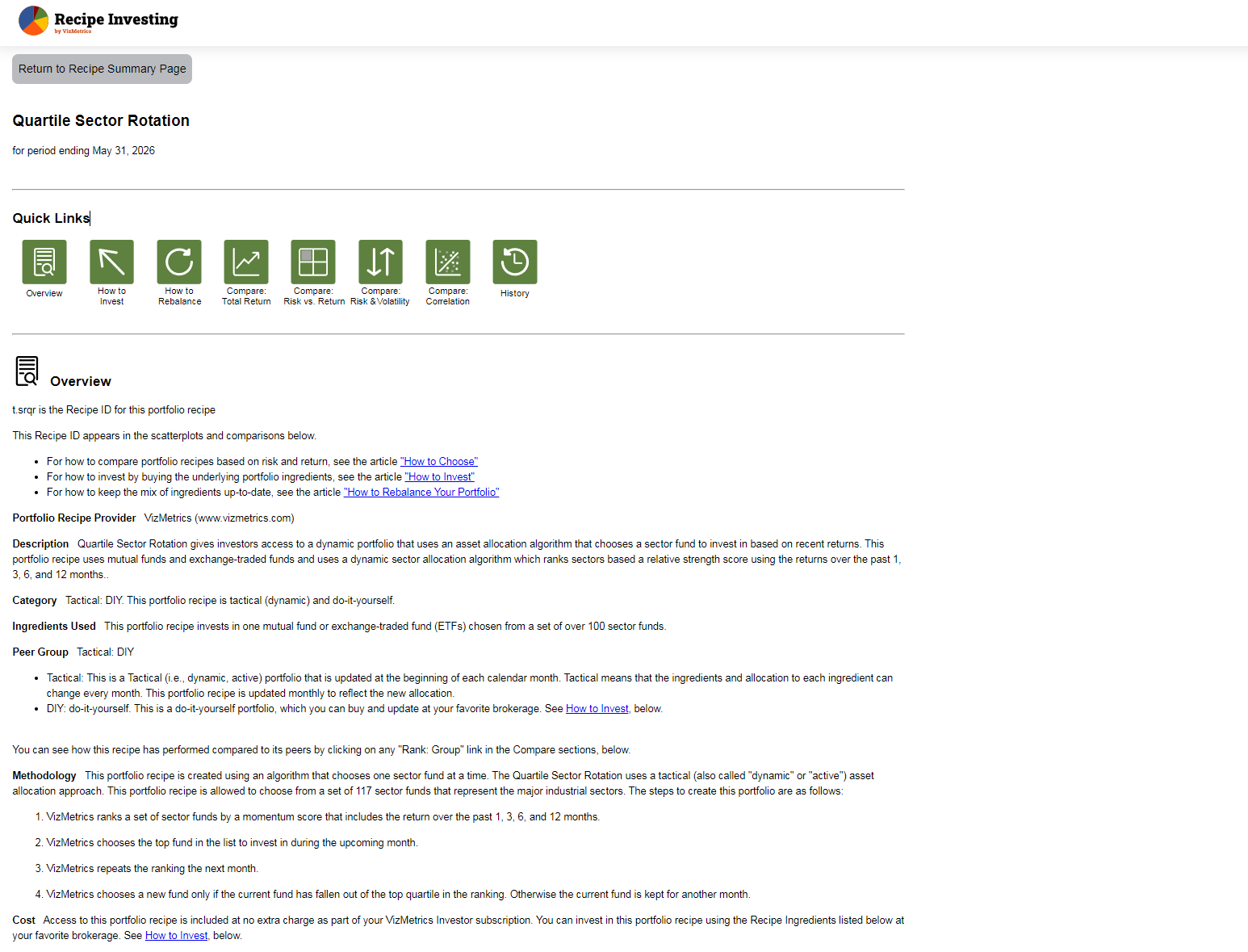
Portfolio Recipe detail: description, ingredients, and peer comparison
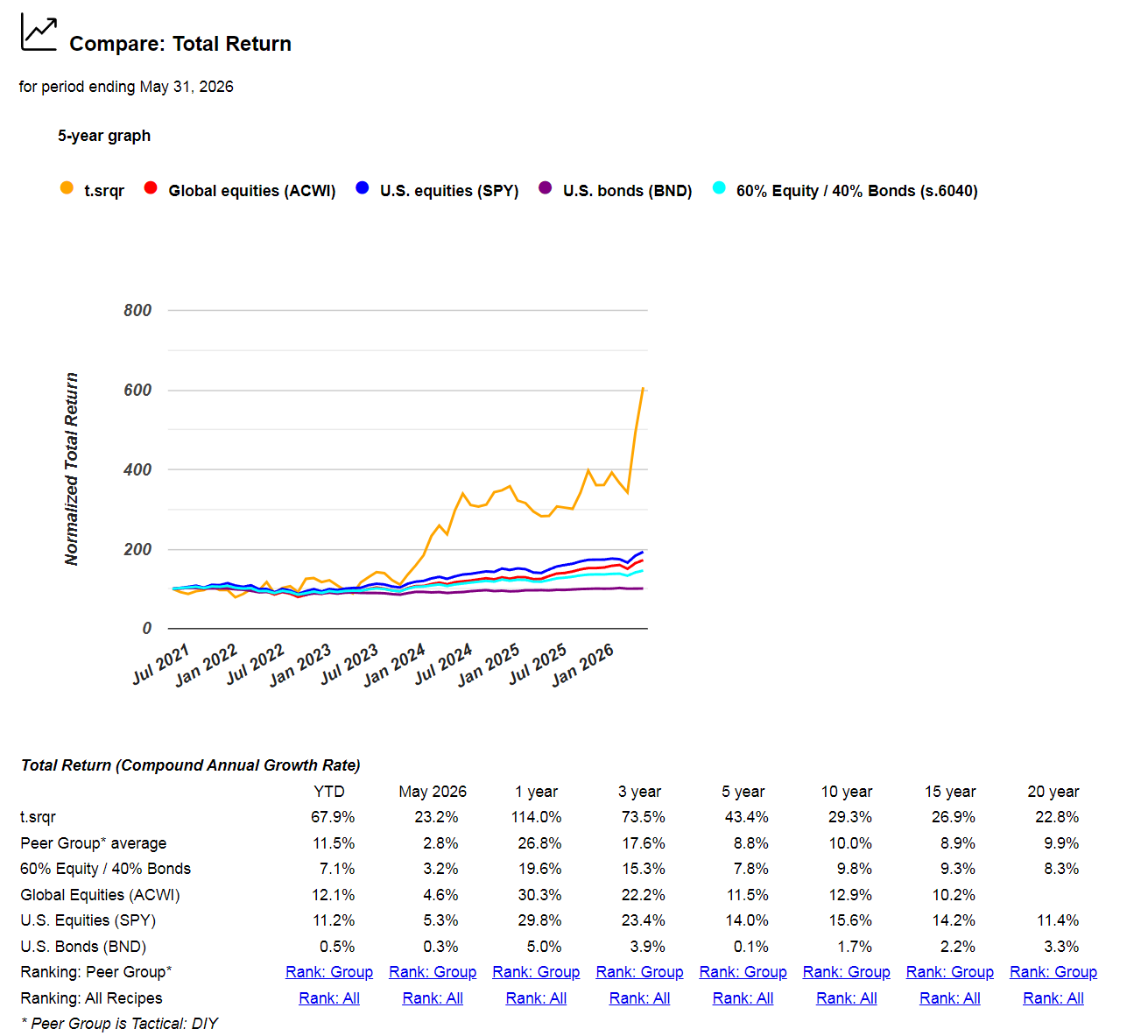
Portfolio Recipe detail: 5-year total return graph
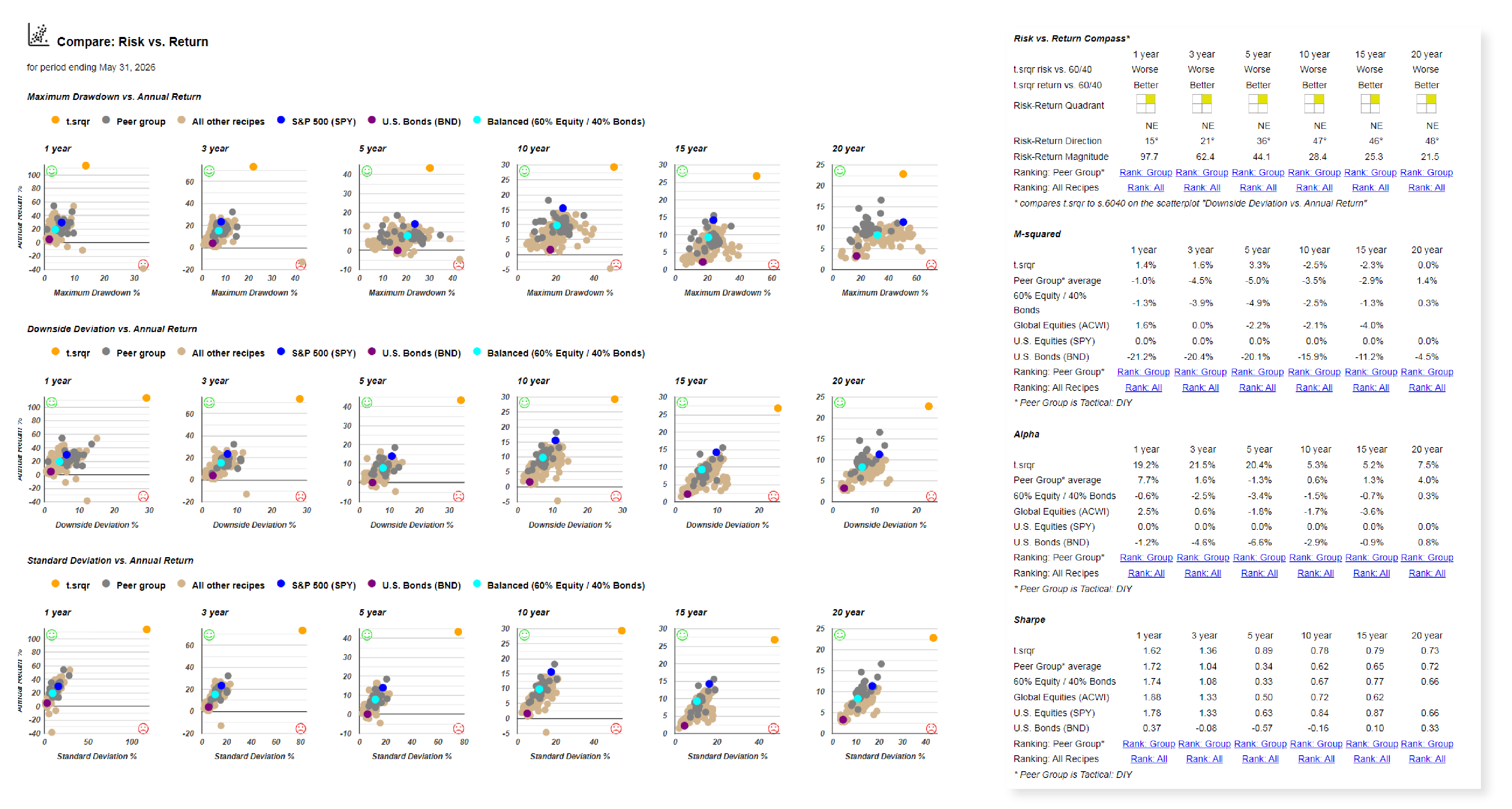
Portfolio Recipe detail: Risk vs. Return metrics
How to Invest in a Portfolio Recipe
These same steps can be used to rebalance a portfolio based on a Portfolio Recipe's updated monthly percentage allocations.
1. Get the Portfolio Recipe allocation percentages and tickers
- Log in at https://go.recipeinvesting.com/login
- Under "Portfolio Recipes" click "View Content"
- Click "Portfolio Recipe Tickers and Allocations for {Month and Year}
- Find Portfolio Recipe you want to invest in, and get the tickers and percentage allocations
- Tactical Portfolio Recipes have IDs that start with "t." (such as t.aaae or t.mva3). The allocations can change every month. Example:
- EEM=2.08%, EFA=5.89%, GLD=40.59%, IWM=8.64%, IYR=10.16%, QQQ=2.79%, SPY=5.61%, TLT=24.24%.
- Strategic Portfolio Recipes have IDs that start with "s." (such as s.plus or s.brow). The allocation will remain the same each month. Example:
- VTI=60%, BND=40%
- Managed Portfolio Recipes are funds with a single ticker (e.g., VWIAX or DVY). The only ticker to buy will be the fund itself. The allocation will remain at 100% each month. Example:
- VWELX=100%
- Tactical Portfolio Recipes have IDs that start with "t." (such as t.aaae or t.mva3). The allocations can change every month. Example:
2. Update the tickers and percentage allocations at your brokerage
Open and fund an account at your favorite brokerage. If you're a do-it-yourself investor, we recommend Interactive Brokers since they allow rebalancing by percentages, which is how we publish the Portfolio Recipe allocations.
No matter your brokerage, it's simplest to create a new account for each Portfolio Recipe that you invest in. This allows you to 1) keep your cash and other investments separate from the Portfolio Recipe and 2) track the Portfolio Recipe performance based on the account performance.
How to Create or Rebalance a Portfolio Recipe at Interactive Brokers
Interactive Brokers allows investors to trade securities using target percentages in an account using the Rebalance Portfolio tool in Trader Workstation (TWS). If Interactive Brokers has changed the wording or buttons on its pages, please let us know.
Use these instructions to update an IBKR account's holdings to match a Portfolio Recipe's updated percentage allocation. Using IBKR's "Rebalance Portfolio" tool, these instructions will rebalance the entire IBKR account. To make rebalancing easier, you can open a separate IBKR account for each separate Portfolio Recipe.
Step 1: Open the Rebalance Portfolio tool in Trader Workstation
- If needed, download and install the latest version of Trader Workstation
- Launch Trader Workstation
- Log in to the correct Interactive Brokers account
- Open Rebalance Portfolio, as follows:
If using the Mosaic tab:
- Select New Window in the upper-left corner
- Under Other Tools, select Portfolio Tools / Rebalance Portfolio
If using the Classic TWS tab:
- In top menu, select Trading Tools
- Select Rebalance Portfolio
You should see a window with the title REBALANCE PORTFOLIO appear, with a table showing the account’s current positions, under the heading "Financial Instruments"
Step 2: Add any new tickers needed for the Portfolio Recipe allocation
- In the REBALANCE PORTFOLIO window, under TOTAL CASH, click a blank row
- Enter the ticker symbol (e.g., GLD) and press Enter
- In the pop-up window, select the correct security type
- Select "Stock" for ETFs
- Select "Fund" for Mutual Funds
- Repeat for any other needed tickers.
If all the tickers needed for the Portfolio Recipe have been added to the table, you are ready for Step 3.
Step 3: Enter the target percentages
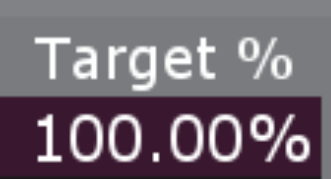
- For each ticker, enter the target percentage for the upcoming month (from go.recipeinvesting.com) in the Target % column
- Enter 0% for any ticker that does not appear in the updated Portfolio Recipe
- Verify that the target percentages total 100.00% in the top row
Step 4: Create the rebalance orders
Under the heading “Create Orders,” click “Create Rebalance Orders”

It may take a few seconds for the orders to be generated. If you see the message "You have a new order. Would you like to expand the Orders panel to view new orders?" click "Yes"
In the Trading panel, review the proposed Buy and Sell orders:
- "Action" column should show:
- SELL for the tickers with a Target % of 0%
- BUY or SELL for the tickers with a Target % greater than 0%, depending on the existing holdings.
- "Time in Force" column should show "DAY," which means the order is only good for the current trading day.
- "Type" column should show "MKT" which means the order will be filled at the prevailing market price. MKT is used here because it fills immediately and completely, so you are not left with a partial or unfilled order.
- Note: submit your trades only when the market is open (not after hours) to get the best price.
- "Destination" column should be:
- SMART for ETFs, which is IBKR's order router that automatically finds the best available price across exchanges.
- FUNDSERV for mutual funds. Mutual funds trade at the end of the day.
Note: The Target % values will rebalance the entire account. Use a separate account for each Portfolio Recipe that you invest in.
Step 5: Adjust your orders to leave enough cash to pay commission
If you have an IBKR Lite account, you get commission-free trading. So unless you are buying or selling a fee-based mutual fund, you can skip this step.
If you have an IBKR Pro account, commissions are withdrawn from the trading account when trades are executed. Commissions can't be paid separately, so you'll need to have enough cash in your account for commissions. You can do this by reducing the Target % of the largest allocation by a small amount until you have the cash needed for your commission.
Interactive Brokers offer two pricing plans for IBKR Pro commissions:
- IBKR Pro Fixed charges $1.00 for less than 200 shares, $0.005 per share above 200 shares, up to a max of 1% of trade value maximum. So you could leave $1 in cash in your account per trade to cover commission fees.
- IBKR Pro Tiered. For trades of less than 50 shares, about $.0067 per share above that, up to a max 1% of trade value. So you could leave $0.50 in cash in your account per trade to cover commission fees.
To find out what pricing plan you're on at IBKR:
- In Trader Workstation's top menu, choose Account / Account Management Home
- You should see a new webpage open with your account dashboard
- At the top right, click the Torso icon, then choose Settings
- You should see the Settings page
- Under the heading "Account Configuration," see your "IBKR Pricing Plan"
Step 6: Submit the rebalance orders
- Click the button "Submit All Orders"
- Review the final IBKR order-confirmation window
- Submit the orders
Step 7: Confirm the completed rebalance
- Go to Account / Portfolio Window to see the pending trades
- Monitor the orders until they are filled. Orders may fill at different times and prices
- After the orders are filled, go to Trading Tools / Rebalance Portfolio
- Compare the new Current % values with the Portfolio Recipe target allocation percentages
Note: Exact percentages are not guaranteed because market values continually change. Small differences are normal because market prices may change while orders are being processed.
How to Create or Rebalance a Portfolio Recipe at other brokerages (e.g., Schwab, Fidelity, Vanguard)
For brokerages that don't support percentage-based portfolio creation and rebalancing, use these steps to convert the Portfolio Recipe allocations into share quantities.
- Decide the total dollar amount you want to invest in the Portfolio Recipe.
- For each ticker, multiply its percentage allocation for the upcoming month by your total investment amount. The result is the dollar amount to invest in that ingredient.
- Look up the current share price for each ingredient on your broker's website.
- Divide the dollar amount for each ingredient by its share price to get the number of shares to buy. Round to whole shares if your broker does not support fractional shares.
- Make a list of trades, pairing each ticker with its share quantity.
- Enter the trades with your broker.
To rebalance each month, repeat these steps using the updated monthly allocations. For tactical recipes, the allocations change each month, so you will need to compare your current holdings to the new targets and buy or sell the difference.
How to Use Rebalancing Tools to Implement Portfolio Recipes (For Financial Advisors)
If you manage client accounts, you can implement Portfolio Recipe allocations using a variety of tools.
Rebalancing tools provided by leading custodians
- Interactive Brokers has two tools for rebalancing.
- Model Portfolios let an advisor update target percentage allocations for a custom portfolio and rebalance. https://www.interactivebrokers.com/en/trading/model-portfolios.php
- Rebalance Portfolio window in Trader Workstation (TWS) lets advisors set target weights and rebalance an entire portfolio for all accounts, a group of accounts, or an individual account, not just models.
- https://www.interactivebrokers.com/en/trading/rebalance-portfolio.php
- Charles Schwab provides iRebal, a rule-based rebalancing tool built into Schwab Advisor Center at no additional software cost. Access requires completing a short interest survey through Schwab Advisor Services.
- Fidelity provides Advanced Modeling and Rebalancing, integrated into the Wealthscape platform. It offers household rebalancing, asset-class model construction and rebalancing, and tax-aware capabilities.
- BNY Pershing provides rebalancing through the NetX360+ platform and the newer Wove platform. Wove provides advisor applications including cross-custodian trading and rebalancing.
- LPL Financial: LPL provides model management and rebalancing through its advisor platform and supports integrated third-party rebalancing software.
Rebalancing tools that work with multiple custodians, from third-party companies
- Smartleaf provides an automated rebalancing platform that emphasizes tax efficiency and customization, using continuous monitoring to keep portfolios aligned with client-specific policies at scale. https://www.smartleaf.com/
- Morningstar tRx (Total Rebalance Expert) is a tax-efficient rebalancing tool with loss harvesting at the account or household level. https://www.morningstar.com/business/products
- RedBlack provides a standalone rebalancing and trading platform that supports security, asset-class, and models-of-models strategies, with real-time compliance validation and rule-based restrictions. Available as a desktop or cloud solution. https://redblacksoftware.com/rebalancing-and-trading
- SoftPak offers Managed Accounts Rebalancing System (MARS), a tool with model-focused rebalancing, providing tax efficiency and asset allocation features. https://www.softpak.com/
3. Track your progress and rebalance monthly
After your buys are confirmed, track your portfolio's progress in your brokerage account. For tactical (t.) Portfolio Recipes, rebalance your portfolio at the beginning of the next month, by logging in at go.recipeinvesting.com to get the updated list of tickers and percentage allocations for the new month.